How to Make a Hotel Lobby AI Rap Video
 RAPVID.ART Studio Team
Step-by-step guide to making a viral Hotel Lobby AI Rap Video on RAPVID.ART from 2 photos using Seedance 2.0 Pro or Kling 4.0 in minutes.
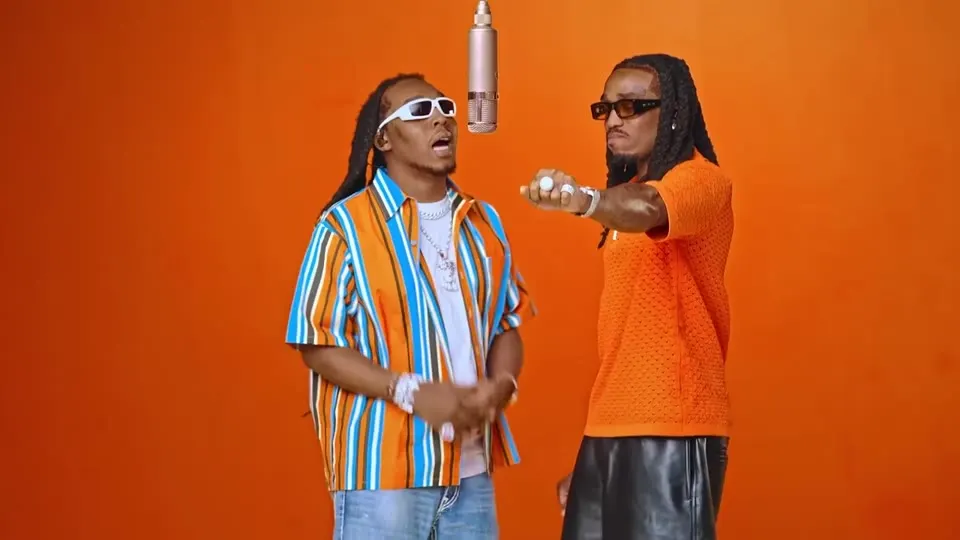
The Hotel Lobby AI Rap Video trend—inspired by Quavo & Takeoff's iconic HOTEL LOBBY (Unc & Phew) performance inside the minimalist orange COLORS×STUDIOS vocal booth—has generated hundreds of millions of views across TikTok, Instagram Reels, and YouTube Shorts.
With RAPVID.ART, you do not need video editing software, green screens, or complex prompt engineering. You can turn 2 front-facing portrait photos into a beat-locked, watermark-free 1080p rap duo video in minutes.
Why the Hotel Lobby Orange Booth Format Goes Viral
Three visual and acoustic elements make the Hotel Lobby AI template an instant scroll-stopper:
- High-Contrast Minimalist Set: The warm
#FF5500acoustic wall and central condenser microphone isolate the two performers so viewers immediately recognize the faces in the first 0.5 seconds. - Back-and-Forth Duo Chemistry: Performer 1 delivers the main verse while Performer 2 drops ad-libs and shoulder bounce—making it hilarious for pairing best friends, couples, coworkers, or rival sports icons.
- 156 BPM Trap Cadence: Pre-synced phonetic viseme timing locks jaw and lip movement to every snare hit and bass drop.
Step-by-Step: Create Your Hotel Lobby AI Video
Step 1: Select the Hotel Lobby Template
Open the Hotel Lobby AI Video Generator (or pick Hotel Lobby in the main studio workbench). The template comes pre-configured with the orange studio lighting, hanging microphone choreography, and 156 BPM rap audio.
Step 2: Upload 2 Front-Facing Portrait Photos
- Performer 1 (Left Rapper — Lead Verse): Upload a clear, front-facing photo where both eyes, nose, and mouth are unobstructed.
- Performer 2 (Right Rapper — Hype & Ad-Libs): Upload your second portrait photo.
- Mobile Bridge Tip: Working on a desktop computer while your photos are on your phone? Click the QR Code button inside either upload slot and scan with your phone camera to beam photos directly into the workbench.
Step 3: Choose Aspect Ratio, Resolution & AI Video Engine
- Aspect Ratio: Pick 9:16 Vertical for TikTok, Reels, and Shorts, or 16:9 Widescreen for YouTube and Discord.
- Resolution & Duration: Choose 720p HD or 1080p Full HD, and 5s, 10s, or 15s duration.
- AI Video Engine:
- Seedance 2.0 Pro: Recommended for the crispest 1080p facial identity preservation and lip-sync.
- Kling 4.0: Recommended when you want dynamic two-man vocal booth camera sway and upper-body rhythm.
- Seedance 2.0 Mini / Fast: Best for quick
$1.99(15–35 Cr) draft tests before rendering your final 1080p master. - Seedance 2.5 Ultra: Flagship reference-video model for 1080p renders.
Step 4: Render & Download Watermark-Free MP4
Click Generate Rap Video. Guests can check out instantly with a $1.99 Single Video Pass (no login required), or Studio members can use One-Time Credit Packs or Monthly Subscriptions to pay less per credit.
Portrait Photo Checklist for Better Lip-Sync
- Good Lighting: Even front lighting prevents dark shadows around the jawline during rapid rap syllables.
- Neutral or Closed-Mouth Expression: Neutral lips map more cleanly onto open/closed vowel transitions than exaggerated wide smiles.
- Avoid Heavy Occlusions: Remove hands covering the chin, oversized sunglasses, or extreme side-profile angles.
Ready to drop your duo track? Launch the Hotel Lobby AI Video Generator →
Turn 1 to 5 Photos into a Viral AI Rap Video in Minutes
Pick from 7 viral studio templates (Hotel Lobby, Migos, APT., Gas Station Dance AI, Bulin 47, BBY Guy Meme Maker & Tiny Desk AI). Start with a Single Pass from $1.99 (no login required) or save 20% with annual Studio Plans.